


Hello Sir,
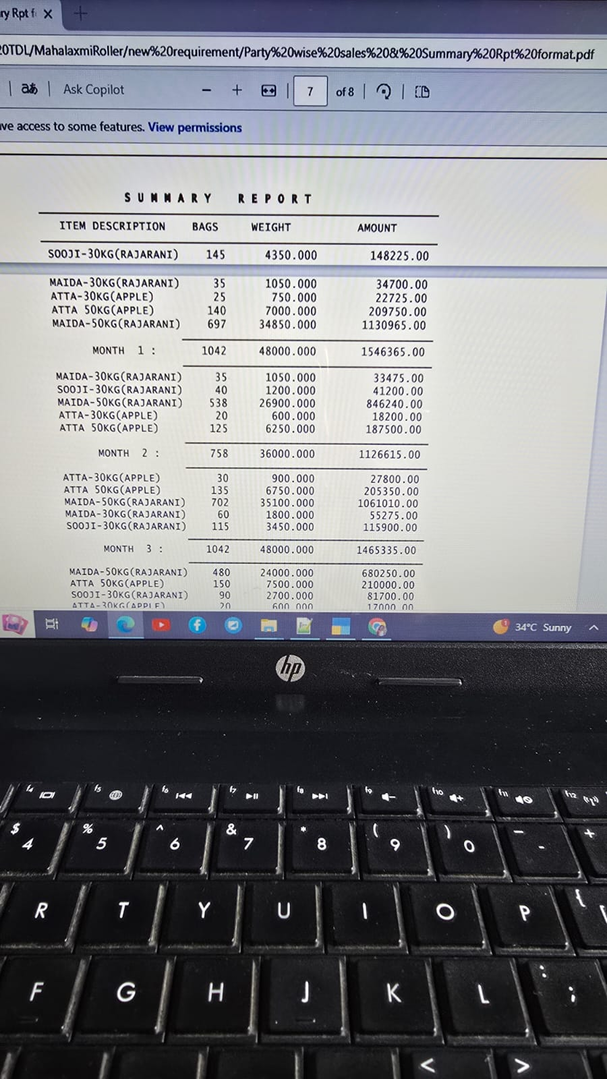
This is stock summary report of sales.
Horizontally there are month lines repeating upto Dec month.Its not autocolumnar report.
This is a report of stockItem of a perticular party,in a perticular period, how much items sale done.
Please Help.

The report format you have shown in the screenshot is not generated and not available in default TallyPrime.
In TallyPrime to generate Party Wise Item Wise Month wise sales you may go to Display More Reports > Statement of Inventory > Movement Analyses > Ledger Analyses > Choose Ledger > Press F12: Disable Show Purchases > Press ALT+N: Auto Column to generate Month wise sales report automatically as shown in below snapshot;


Regards,
Dhaval Goradia
Ohk Sir,Will check,thank you

Hello,
From the screenshot, it appears that the report is displaying item-wise sales for a particular party, grouped month-wise. The month headings (Month 1, Month 2, Month 3, etc.) are being generated manually rather than through Tally's Auto Column feature.
Could you please clarify what exactly needs to be modified?
-
Do you want the month names (April, May, June, etc.) instead of Month 1, Month 2?
-
Do you want all months displayed horizontally in separate columns?
-
Or are you facing an issue with the grouping or totals?
If this is a custom TDL report, please share the relevant TDL code related to the collection, repeat line, and month grouping logic. That will help in identifying the required changes more accurately.